Platform image sizes
Last updated: 2026-08-16
Pixel sizes for Instagram, YouTube, LinkedIn, X, Amazon, Etsy, IAB ads, and wallpapers, including which edges platforms crop after upload.
Why one table instead of 24 copies of the editor
Each preset in ImageRecrop is the same editor with a width, height, and sometimes a mode already filled in. The useful information is the size itself and what the destination does after you upload. That belongs in one place.
Use this page to choose a size. Then open the matching preset only if you want the crop box pre-loaded. The home page also accepts any custom width and height.
Safe areas on wide banners
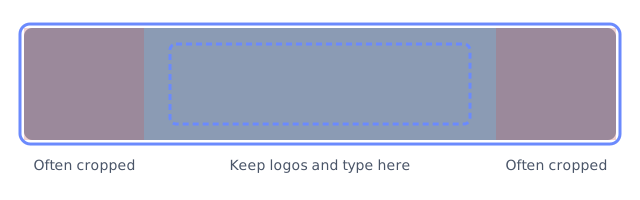
LinkedIn (1584 by 396), X (1500 by 500), Facebook cover (820 by 312), and Twitch (1200 by 480) are much wider than they are tall. Profile photos, follow buttons, and mobile layouts cover the left and right ends. Put the logo and any text in the center third before you export.
Social and video
| Use | Pixels | Ratio | Notes from the preset |
|---|---|---|---|
| Instagram feed square | 1080 x 1080 | 1:1 | Keep faces off the extreme edges; the app can apply a slight extra crop. |
| Instagram portrait feed | 1080 x 1350 | 4:5 | Tallest standard feed size. More vertical space than the square post. |
| Instagram Story / Reels cover | 1080 x 1920 | 9:16 | UI chrome covers the top and bottom. Keep headlines in the middle band. |
| YouTube thumbnail | 1280 x 720 | 16:9 | Stay under 2 MB. Large type reads better after YouTube scales the image down. |
| Open Graph / link preview | 1200 x 630 | 1.91:1 | Used by Facebook, LinkedIn, Slack, and many chat unfurls. |
| LinkedIn banner | 1584 x 396 | 4:1 | Mobile crops the sides. Center the artwork. |
| X header | 1500 x 500 | 3:1 | The avatar overlaps the lower left. Do not put text there. |
| Facebook cover | 820 x 312 | about 2.6:1 | Desktop cover slot. Center text; phones crop more aggressively. |
| Profile photo | 400 x 400 | 1:1 | Large enough after most apps round or downscale the avatar. |
| Pinterest pin | 1000 x 1500 | 2:3 | Standard vertical pin. |
| Discord server banner | 960 x 540 | 16:9 | Shown on community pages for servers that support banners. |
| Twitch banner | 1200 x 480 | 2.5:1 | TV and mobile apps crop differently. Keep branding centered. |
| Spotify playlist / podcast | 1500 x 1500 | 1:1 | Square artwork for playlist and podcast covers. |
Commerce, ads, email, and wallpapers
| Use | Pixels | Ratio | Notes from the preset |
|---|---|---|---|
| Amazon main image | 2000 x 2000 | 1:1 | Meets the 1000 px minimum with room for zoom. Prefer a clean background. |
| Etsy listing photo | 2700 x 2025 | 4:3 | Shortest side is above Etsy's 2000 px recommendation. |
| IAB medium rectangle | 300 x 250 | 6:5 | Keep the call to action inside the center. Some publishers add a border. |
| IAB leaderboard | 728 x 90 | about 8:1 | Short canvas. Horizontal layouts only. |
| IAB wide skyscraper | 160 x 600 | 4:15 | Stack message, image, and logo. 160 px is a tight width for type. |
| Email header | 600 x 200 | 3:1 | 600 px matches a common email content column. |
| Favicon / app icon | 512 x 512 | 1:1 | Export PNG. It scales down cleanly for browser tabs. |
| Passport / 2x2 in at 300 DPI | 600 x 600 | 1:1 | Pixel size only. Check the country's current photo rules. |
| iPhone wallpaper | 1170 x 2532 | about 9:19.5 | Place the subject slightly above center so widgets and the clock do not cover it. |
| 4K desktop wallpaper | 3840 x 2160 | 16:9 | JPEG is the practical format for photographs at this size. |
Aspect-only frames
16:9 at 1920 by 1080 and 4:3 at 1600 by 1200 are generic frames, not platform slots. Use them for slides, video stills, and prints when no app has given you a stricter spec.
Open any size from the preset list if you want the crop box pre-filled. For a custom size, use the width and height fields on the home page.